Golf Simulator Installation: What Homeowners Need to Know
Why Home Golf Simulators Are Booming
Golf simulators have gone from a novelty found in sports bars to a legitimate home amenity that affluent homeowners are building into new construction and renovations. The technology has improved dramatically — modern launch monitors track ball speed, spin rate, launch angle, and club path with accuracy that rivals what PGA tour players use for training.
For Southern California homeowners, the appeal is year-round practice regardless of tee-time availability, the ability to play world-famous courses from your home, and an entertainment experience that doubles as a social centerpiece for hosting. We've seen simulators become the most-used room in the house — surpassing even the home theater.
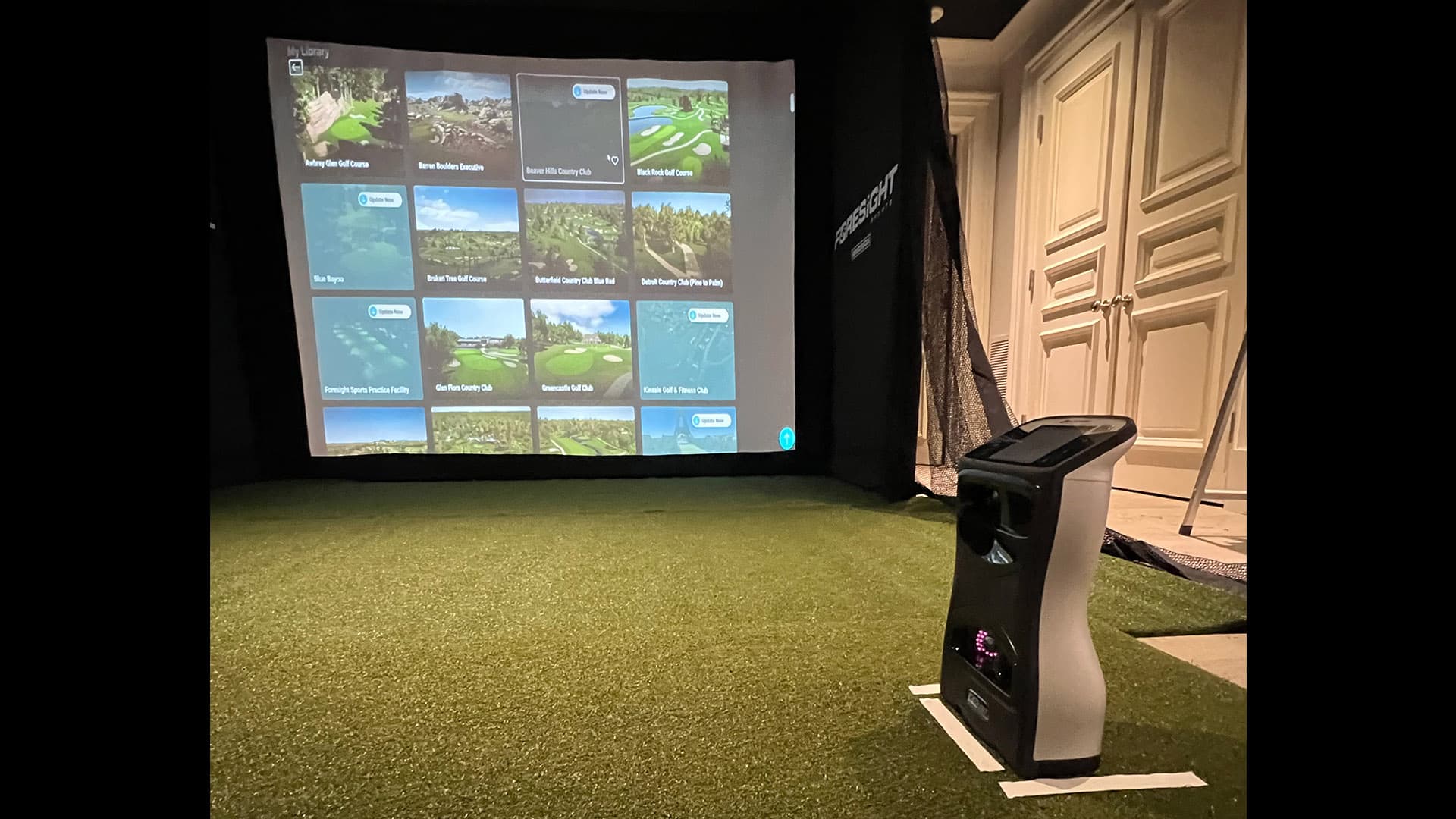
Our Newport Beach golf simulator project converted a 300-square-foot room into a fully immersive experience with high-definition projection, professional swing analysis, and seamless integration with the home's automation system.
Room Requirements and Space Planning
The number-one mistake homeowners make is underestimating the space requirements. A golf simulator needs enough room for a full swing with a driver, adequate distance from the impact screen, and ceiling height to clear the club at the top of the backswing.
Minimum dimensions: 15 feet wide, 18 feet deep, and 10 feet of ceiling height. These are bare minimums — we recommend 16-18 feet wide, 20+ feet deep, and 10-12 foot ceilings for a comfortable experience with room for seating behind the hitting area.
Ceiling height is the most common constraint. A golfer who is 6 feet tall with a standard driver needs roughly 9.5 feet of clearance at the top of the swing. Add a few inches of safety margin and you need at least 10 feet. Homes with 8-foot ceilings in the target room are generally not viable without structural modification.
Flooring matters more than people expect. The hitting area needs a raised platform with turf that allows a tee and provides realistic feedback for iron shots. The surrounding area should be durable enough to handle foot traffic and the occasional errant club throw. We install commercial-grade synthetic turf platforms with integrated tee positions and alignment aids.
Ventilation is often overlooked. A golfer in an enclosed room generates heat and humidity. We specify dedicated HVAC supply and return in simulator rooms to maintain comfortable conditions during extended sessions.
Launch Monitors and Simulation Software
The launch monitor is the brain of the system — it tracks the golf ball and club head to generate accurate shot data. Two primary technologies exist.
Photometric systems (like Foresight Sports' GCQuad) use high-speed cameras to photograph the ball at impact. They're extremely accurate for ball data and work well in compact spaces because they sit just behind the ball. Foresight is our preferred platform for residential installations due to its accuracy, compact form factor, and extensive course library.
Radar-based systems (like Trackman) measure ball flight using Doppler radar. They're the standard on PGA tour ranges but require more room depth (at least 8 feet behind the ball) and are generally more expensive for a home installation.
Simulation software renders the golf course on the impact screen based on launch monitor data. FSX (bundled with Foresight) and E6 Connect are the leading platforms, offering 100+ photorealistic courses including Pebble Beach, St Andrews, and TPC Scottsdale. The software runs on a dedicated PC housed in the room's equipment area.
Multi-sport capability is a bonus for families. Most platforms also support virtual baseball batting cages, soccer, football, and other sports that use the same projection and tracking hardware.
Projection and Display
The impact screen and projector create the visual experience. The screen is a specialized material — strong enough to absorb full-speed golf ball impacts without damage and optically designed to reject ambient light for a bright, clear image.
Screen sizes typically range from 10 to 16 feet wide. We size the screen to the room — filling as much of the wall as possible without distorting the image or creating dead space that breaks immersion.
The projector mounts on the ceiling behind the golfer, throwing the image forward onto the screen. For golf simulators, we specify short-throw projectors rated at 4,000+ lumens to overcome the room lighting needed for safe movement. 4K resolution is ideal for the detail and text readability that simulation software displays.
Ambient light management is handled through the room's automation system. When the simulator powers on, the lighting scene switches to a preset that illuminates the hitting area and seating without washing out the projected image. Blackout shades lower on any windows.
Smart Home Integration
A golf simulator becomes dramatically more enjoyable when integrated with your home automation platform. We connect the simulator room to the same Control4 or Crestron system that runs the rest of the house. See how we approach home theater and media rooms — the same projection, audio, and scene logic apply here.
A single "Golf" scene powers on the projector, launches the simulation software on the PC, sets the room lighting to the optimal preset, adjusts the thermostat for athletic activity, and queues a background music playlist through the room's speakers at a low volume. When you're done, an "Off" scene reverses everything — no need to shut down multiple devices individually.
For homes with distributed audio, the simulator room's speakers can switch between simulation audio (crowd noise, ball flight sounds) and your personal music. Some clients set up a secondary display or tablet mount showing real-time shot data so a coach or friend can follow along without standing directly behind the golfer.
The room's lighting and AV setup also makes it a versatile media space when the simulator isn't in use. Drop a 4K movie on the impact screen, switch the audio to surround mode, and you have an impromptu theater that rivals many dedicated rooms. Explore our Newport Beach golf simulator project for a real installation example, or book a consultation to walk your space with our team.
Frequently Asked Questions
A complete residential golf simulator — including launch monitor, projector, impact screen, turf platform, PC, and installation — typically costs $25,000-$60,000. The launch monitor alone (Foresight GCQuad) is the single biggest expense at $10,000-$15,000. Room construction or modification is additional if needed.
The minimum usable space is approximately 15 feet wide, 18 feet deep, and 10 feet tall. We recommend larger dimensions (16-18 wide, 20+ deep, 10-12 tall) for comfort and to accommodate taller golfers swinging drivers.
Absolutely. The large projection screen and surround audio make the space a natural media room. We integrate both use cases into the automation system — one scene for golf, another for movies or sports viewing. Many clients use the room more for entertainment than golf.
Photometric systems like the Foresight GCQuad measure ball speed within 0.1 mph and spin rate within 50 RPM — accuracy comparable to tour-level fitting equipment. The simulation software translates this data into realistic ball flight and course interaction.
Related Articles
Home Theater vs. Media Room: Which Is Right for Your Home?
A dedicated theater and a media room serve different lifestyles. Compare cost, design, and performance to decide which approach fits your home and how you actually watch.
AutomationSmart Home Automation in Newport Beach, CA
DigitalScene designs and installs luxury smart home systems across Newport Beach — from Newport Coast estates to Balboa Peninsula residences. See our local projects and learn what to expect.
AutomationLuxury Home Automation Trends for 2026
What Orange County luxury homeowners want now: invisible tech, wellness-first lighting, purpose-built rooms like golf simulators, and outdoor living that actually works.
Ready to bring this to your home?
Schedule a free consultation to discuss your project with our team.
Book a Consultation